
1. Introduction: The Shift Towards Digital Healthcare
Healthcare is one of the most critical industries worldwide, but it faces challenges that can directly impact patient well-being. Hospitals often struggle with long waiting times, misplaced records, inefficient billing processes, poor communication among staff, and lack of transparency. These issues not only cause frustration for patients but also lead to operational and financial inefficiencies for hospitals.
In today’s fast-paced, technology-driven world, digital transformation in healthcare is no longer optional—it is essential. Just as banks, retail businesses, and educational institutions have embraced technology, hospitals and clinics must also adopt modern systems that ensure efficiency, accuracy, and security.
This is where Hospital Management Software (HMS) becomes a game-changer.
A well-designed HMS simplifies hospital operations by automating repetitive tasks, centralizing data, improving communication, and ensuring that doctors and staff can focus more on patient care rather than paperwork. From patient registration to billing, pharmacy management to laboratory reports, telemedicine to data security, a hospital management system covers it all.
As the Managing Director of MNP Techs, I have seen firsthand how hospitals in Bangladesh and beyond can benefit from adopting healthcare software solutions. With our expertise in developing management systems for clubs, restaurants, and businesses, we extended our innovation into the healthcare sector. Our goal is to make hospital operations smarter, safer, and more patient-friendly.
This guide will give you a complete picture of hospital management software—what it is, why it matters, its features, benefits, future trends, and how hospitals can implement it successfully. By the end, you’ll understand why HMS is the backbone of modern healthcare operations.
2. What is Hospital Management Software?
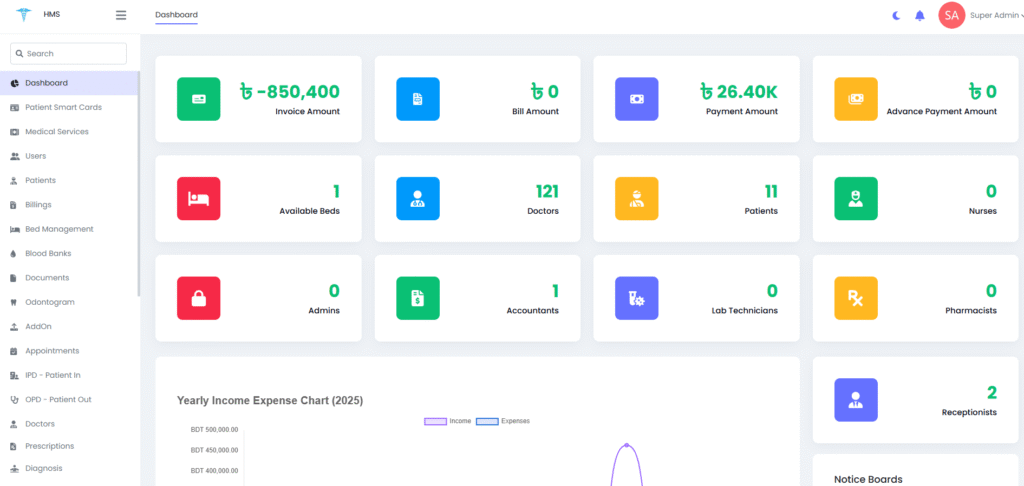
Hospital Management Software (HMS) is a comprehensive, integrated digital platform that automates and streamlines all hospital operations. It connects different departments—administration, finance, pharmacy, laboratory, doctors, nurses, and patients—into one unified system.
Think of it as the central nervous system of a hospital. Every piece of information, from patient details to medical reports and billing, flows through this software, ensuring smooth communication and efficient management.
2.1 Simple Definition
Hospital Management Software is a computerized system that manages hospital workflows digitally. It replaces manual registers, files, and fragmented systems with an all-in-one solution.
2.2 HMS vs. HIS vs. EMR/EHR
HMS (Hospital Management Software): Focuses on overall hospital operations including patient care, billing, pharmacy, staff, and inventory.
HIS (Hospital Information System): Similar to HMS but often used interchangeably, emphasizing administrative and clinical information.
EHR/EMR (Electronic Health/Medical Records): Focuses mainly on storing patient health records and history.
💡 In short: HMS = Big Picture, EMR/EHR = Patient Data.
2.3 How HMS Works (Step-by-Step Example)
Let’s imagine a patient named Rahim visits a hospital using HMS:
Registration: Rahim’s details (name, age, contact, medical history) are entered into the system.
Appointment Scheduling: The receptionist books him with an available doctor, and Rahim receives an SMS reminder.
Consultation: The doctor accesses Rahim’s past records digitally, makes a diagnosis, and enters a prescription into the system.
Laboratory Tests: If tests are required, Rahim goes to the lab. Test requests and results are managed automatically in HMS.
Pharmacy: The prescribed medicines are available in the hospital’s pharmacy, updated instantly in the system.
Billing: All charges (consultation, lab, medicine) are combined into one bill generated digitally.
Discharge/Follow-Up: Rahim gets a discharge summary or follow-up schedule, accessible online through a patient portal.
Everything happens seamlessly—no repeated paperwork, no lost records, no confusion.
3. Why Hospitals Need Hospital Management Software (Detailed Benefits)
Hospitals are complex ecosystems. They handle not just patients, but also doctors, nurses, administrative staff, pharmacies, laboratories, financial operations, and government compliance. Managing all of these manually is not only inefficient but also risky, as mistakes in healthcare can cost lives.
This is exactly why Hospital Management Software (HMS) is not just a luxury—it’s a necessity. Below, I will break down the core reasons hospitals need HMS today.
3.1 Elimination of Manual Paperwork
For decades, hospitals have relied on paper records. But paper is vulnerable—it can be misplaced, damaged, or lost forever. It also takes up massive storage space.
With HMS:
Patient records are stored digitally.
Doctors and staff can instantly retrieve information.
Updates are reflected in real-time.
📌 Example: In a 2019 study in India, hospitals that shifted from paper records to HMS reduced record-keeping errors by 65%.
3.2 Faster Patient Care & Reduced Waiting Times
Long queues at hospitals frustrate patients. Sometimes, delays occur simply because patient files can’t be found, or doctors don’t have access to complete history.
With HMS:
Registration is digital and quick.
Appointments are scheduled efficiently.
Doctors can access reports instantly.
💡 Imagine: A patient comes with chest pain. Instead of wasting time searching for his previous ECG or test results, the doctor gets them instantly on the HMS dashboard—saving precious minutes.
3.3 Improved Communication Between Departments
Hospitals have multiple departments—OPD (Outpatient), IPD (Inpatient), Pharmacy, Labs, Radiology, Billing, Nursing, and more. Miscommunication between them often leads to delays or errors.
With HMS:
All departments work on one platform.
If a doctor prescribes medicine, the pharmacy sees it instantly.
Lab reports are shared digitally with doctors and patients.
This reduces duplication of work and prevents costly mistakes.
3.4 Transparency in Billing & Finances
One of the biggest pain points in hospitals is billing. Patients often complain of hidden charges or lack of clarity.
HMS provides:
Itemized billing (consultation, tests, pharmacy, bed charges).
Insurance claim integration for smoother reimbursement.
Revenue cycle management for hospital administration.
📊 A survey in the US revealed that hospitals using HMS saw a 30% improvement in billing accuracy.
3.5 Enhanced Data Security
Patient data is highly sensitive. Losing it—or worse, leaking it—can destroy a hospital’s reputation.
HMS ensures:
Data encryption.
Role-based access (only authorized people can see data).
Regular backups.
This is crucial for compliance with laws like HIPAA (US) or GDPR (Europe).
3.6 Reduced Operational Costs
Hospitals spend huge amounts on staff hours for repetitive tasks like paperwork, filing, billing, and reporting. HMS automates these processes, reducing manpower needs and saving money.
📉 On average, hospitals save 15–20% annually in operational costs after implementing HMS.
3.7 Better Decision-Making with Analytics
HMS collects and analyzes hospital data. This helps administrators:
Identify departments with the highest patient load.
Track revenue growth.
Predict medicine demand in the pharmacy.
Monitor staff performance.
Data-driven decisions are always more effective than guesswork.
3.8 Improved Patient Experience
At the end of the day, the hospital exists for patients. With HMS, patients enjoy:
Shorter waiting times.
Online appointment booking.
Access to reports and bills through a patient portal.
Transparency in billing.
A smooth, technology-driven experience increases patient satisfaction and builds long-term trust.
3.9 Scalability for Hospitals of All Sizes
Whether it’s a 10-bed rural clinic or a 1,000-bed multi-specialty hospital, HMS adapts to the scale. Small clinics use it for patient and billing management, while large hospitals integrate multiple modules including telemedicine, advanced lab systems, and cloud backup.
3.10 Compliance with Government & Medical Standards
Governments and healthcare boards often require hospitals to maintain patient records digitally. HMS makes compliance easy by:
Generating digital reports.
Maintaining accurate audit trails.
Providing easy data export for authorities.
4. Key Features & Modules of Hospital Management Software
A good Hospital Management Software is not a single tool but a collection of modules that work together. Each module handles a specific hospital function, but since they’re integrated, information flows seamlessly across departments.
Below are the core modules every hospital should consider when adopting HMS:
4.1 Patient Management System
This is the heart of any HMS. It manages everything about patients, from registration to discharge.
Key Functions:
Patient registration & demographic details.
Appointment scheduling (with SMS/email reminders).
Patient history & visit records.
Digital discharge summary.
Patient portal for accessing reports online.
Use Case: A patient walks in for the third time in a year. Instead of filling up new forms, the receptionist retrieves his entire history with a single click.
Benefit: Saves time, ensures accurate medical history, and improves the patient experience.
4.2 Doctor & Staff Management
Hospitals are people-driven, and managing staff is often challenging. This module helps in organizing workforces efficiently.
Key Functions:
Doctor availability & scheduling.
Duty rosters & shift management for nurses.
Attendance tracking.
Performance reports for HR.
Use Case: If a hospital has 30 doctors and 70 nurses, this module ensures smooth shift rotation and avoids confusion about who is on duty.
Benefit: Eliminates scheduling conflicts and improves workforce productivity.
4.3 Billing & Accounting
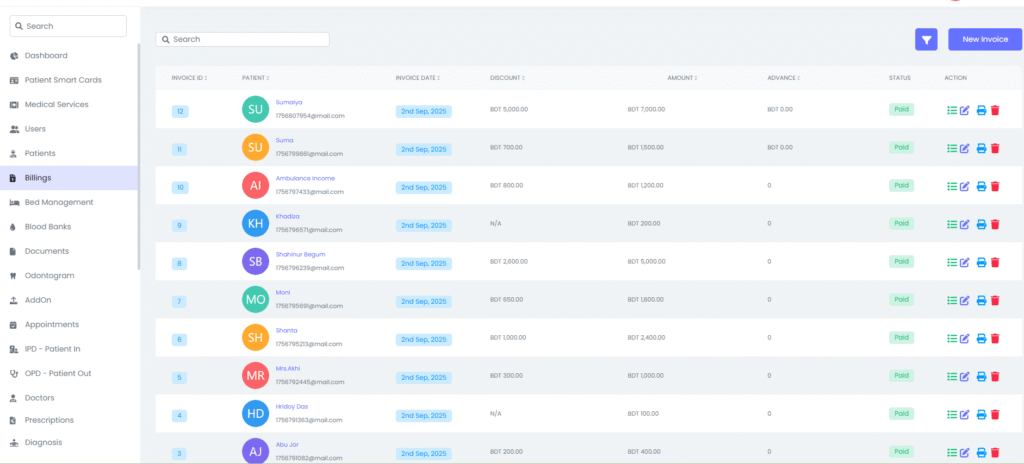
Financial transparency is critical in healthcare. Patients want clarity, and administrators need proper revenue tracking.
Key Functions:
Automated billing for consultations, tests, surgeries, pharmacy, and room charges.
Insurance claim processing.
Integration with accounting systems.
Financial reporting & analytics.
Use Case: Instead of generating bills from different departments separately, the HMS consolidates everything into one final bill.
Benefit: Reduces disputes, increases billing accuracy, and improves hospital revenue cycle.
4.4 Pharmacy Management
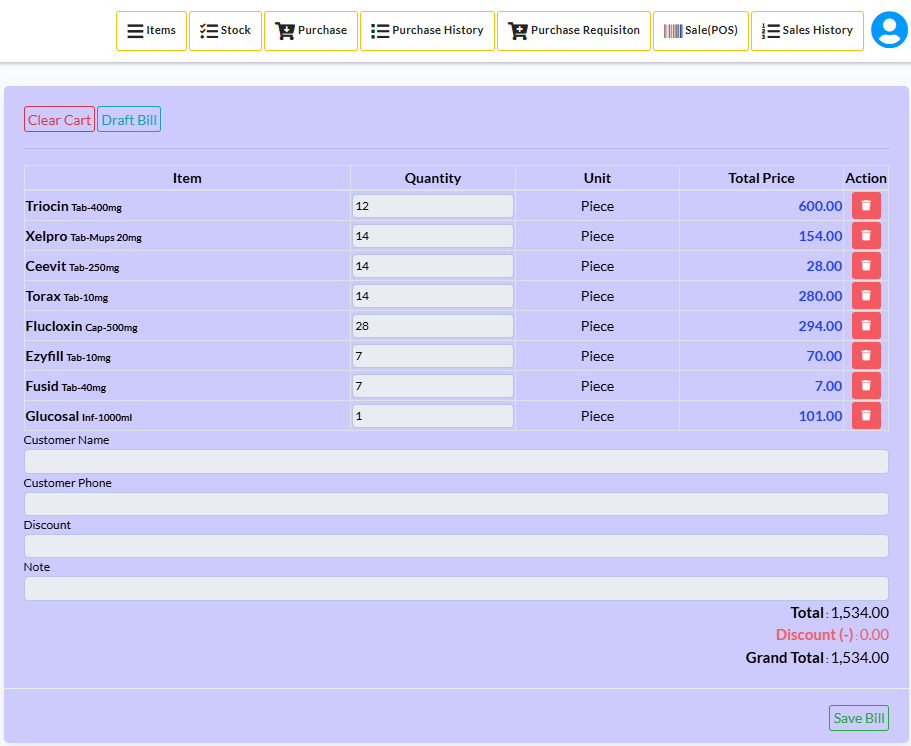
Pharmacies are often a major source of hospital revenue, but manual stock-keeping can lead to expiry losses and stockouts.
Key Functions:
Medicine stock & batch tracking.
Expiry alerts for drugs.
Prescription management (direct integration with doctor module).
Automated billing at the pharmacy counter.
Use Case: When a doctor prescribes medicine, the pharmacy system checks availability. If the stock is low, it automatically alerts procurement staff.
Benefit: Prevents medicine shortages and ensures timely refills.
4.5 Laboratory Management
Labs generate a large volume of diagnostic data daily. This module streamlines test booking, processing, and reporting.
Key Functions:
Test scheduling & online requests.
Sample collection tracking.
Automated lab report generation.
Integration with patient records and doctor dashboard.
Use Case: Instead of manually delivering lab results to doctors, the system uploads results instantly to the patient’s digital profile.
Benefit: Reduces reporting delays and human errors.
4.6 Operation Theater (OT) Management
Surgeries require precise planning. This module ensures that operation theaters, equipment, and staff are available when needed.
Key Functions:
OT scheduling.
Equipment allocation (ventilators, monitors, etc.).
Pre- and post-operative records.
Staff duty allocation during surgeries.
Use Case: A patient’s surgery is scheduled. The system automatically blocks the operation theater, alerts the surgical team, and reserves required equipment.
Benefit: Prevents clashes in scheduling and ensures smooth surgical operations.
4.7 Inventory & Asset Management
Hospitals depend heavily on medical supplies and equipment. This module prevents shortages and keeps track of assets.
Key Functions:
Stock management (gloves, syringes, surgical kits).
Equipment usage and maintenance logs.
Supplier & procurement tracking.
Cost optimization reports.
Use Case: The system alerts when oxygen cylinders are running low and auto-generates a purchase request.
Benefit: Prevents stockouts during emergencies and reduces wastage.
4.8 Nursing & Ward Management
Managing patients in wards requires careful coordination.
Key Functions:
Bed allocation (ICU, general, private).
Nurse duty allocation.
Patient monitoring updates.
Nurse-patient ratio tracking.
Use Case: If a new patient is admitted, the system shows available beds and assigns a nurse on duty.
Benefit: Enhances patient care and reduces workload stress on nurses.
4.9 Telemedicine Integration
Post-pandemic, telemedicine has become a necessity. Many patients prefer online consultations.
Key Functions:
Online video consultations.
Digital prescriptions.
Remote patient monitoring.
Payment integration for online visits.
Use Case: A patient living 200 km away can consult a city doctor via video call and receive e-prescriptions.
Benefit: Expands hospital reach and increases patient convenience.
4.10 Electronic Medical Records (EMR) / Electronic Health Records (EHR)
This module stores all medical data digitally.
Key Functions:
Patient history, allergies, previous diagnoses.
Imaging & lab reports integration.
Access control for doctors.
Data portability between hospitals.
Use Case: If a patient is transferred from one hospital to another, their entire record can be shared digitally without paperwork.
Benefit: Prevents duplicate tests, saves time, and improves accuracy.
4.11 Data Security & Compliance Module
Protecting sensitive medical data is non-negotiable.
Key Functions:
Role-based access control.
Data encryption.
HIPAA & GDPR compliance.
Automated audit trails.
Use Case: A receptionist can only access patient registration data but cannot view lab results or financial records.
Benefit: Protects patient privacy and ensures legal compliance.
5. Benefits of Hospital Management Software
Hospital Management Software doesn’t just make hospital operations easier—it transforms the entire healthcare ecosystem. The benefits extend to every stakeholder: patients, doctors, nurses, administrative staff, and hospital owners. Let’s go deeper into how each group benefits.
5.1 Benefits for Patients
Patients are at the center of healthcare, and their satisfaction directly impacts a hospital’s reputation. HMS ensures:
Faster Registration & Appointment Booking
No more long queues and endless forms. Patients can register online and book appointments with available doctors in minutes.
Transparency in Billing
Patients receive clear, itemized bills covering consultations, lab tests, pharmacy, and room charges. This eliminates mistrust about hidden fees.
Access to Health Records Online
Through patient portals, patients can view medical history, prescriptions, and lab results anytime, anywhere.
Reduced Waiting Time
Appointment scheduling and digital record access speed up consultations.
Better Experience & Trust
A smooth process—from admission to discharge—improves patient satisfaction and loyalty.
📌 Example: A diabetic patient using HMS-based hospital services can easily track their lab test history online and share it with a specialist without repeating tests.
5.2 Benefits for Doctors
Doctors are the backbone of any hospital. An HMS allows them to focus on treating patients rather than managing paperwork.
Quick Access to Patient History
Doctors can instantly view past diagnoses, allergies, lab reports, and treatment history.
Accurate Prescriptions
Digital prescriptions reduce errors caused by handwriting or miscommunication.
Time Management
Automated appointment scheduling ensures doctors spend more time with patients instead of administrative tasks.
Collaboration with Other Specialists
Integrated systems allow different doctors to consult on the same patient digitally.
📌 Example: A cardiologist can review a patient’s previous ECG results and compare them instantly using HMS instead of relying on paper files.
5.3 Benefits for Nurses & Medical Staff
Nurses and staff form the operational backbone of hospitals. HMS makes their tasks more organized and less stressful.
Clear Duty Rosters
Automated scheduling ensures fair distribution of shifts and avoids conflicts.
Easy Access to Patient Updates
Nurses can see patient status (medication schedule, vital signs, pending tests) in real-time.
Task Automation
Automated reminders for medicine, lab samples, and discharge instructions reduce workload.
Improved Communication
Nurses, doctors, and administration stay on the same page through the HMS dashboard.
📌 Example: If a nurse misses a manual note about a patient’s medicine timing, it could be life-threatening. With HMS, digital reminders prevent such errors.
5.4 Benefits for Administrative Staff
Hospital administration often struggles with managing records, finances, and compliance. HMS brings efficiency and clarity.
Centralized Data Management
All patient, staff, and financial data is available in one system.
Reduced Paperwork
Automated reports and billing save staff hours every day.
Compliance Made Easy
Hospitals can quickly generate reports required by health authorities or insurance companies.
Cost Savings
Less manpower required for repetitive clerical tasks.
📌 Example: A mid-sized hospital in Dhaka reported saving 20 hours of administrative work per week after switching to HMS.
5.5 Benefits for Hospital Owners & Management
Hospital owners need to balance quality care with profitability. HMS provides actionable insights.
Revenue Cycle Management
Real-time financial reports show income from OPD, IPD, pharmacy, labs, and surgeries.
Reduced Revenue Leakages
HMS ensures no service goes unbilled, preventing revenue loss.
Data-Driven Decision Making
Analytics help owners identify profitable services and underperforming departments.
Scalability & Growth
HMS allows smooth expansion when hospitals open new branches.
📌 Example: A hospital using HMS discovered that its diagnostic lab was generating more revenue than expected. With this insight, they expanded lab services, increasing revenue by 25% in one year.
5.6 Benefits for the Healthcare Ecosystem
Beyond individual stakeholders, HMS creates a larger positive impact:
Improved Healthcare Standards – Hospitals deliver more reliable, consistent care.
Data for Research & Policy – Governments and research bodies can use anonymized data for healthcare planning.
Sustainability – Going digital reduces paper use, supporting eco-friendly operations.
6. Manual vs. Digital Hospital Management
Before the rise of Hospital Management Software (HMS), hospitals relied heavily on manual processes: registers, physical files, handwritten prescriptions, and manual billing. While some small clinics still operate this way, the limitations are significant. HMS offers a digital-first, error-free, and highly efficient alternative. Let’s break down the comparison.
6.1 Manual Hospital Management – Challenges
Managing a hospital manually comes with serious drawbacks:
Paperwork Overload
Thousands of files and registers must be stored, tracked, and retrieved.
Risk of lost, misplaced, or damaged records is high.
Time-Consuming
Staff waste valuable hours filling forms, copying records, and updating ledgers.
Human Errors
Mistakes in billing, prescriptions, or patient records can lead to life-threatening consequences.
No Data Security
Paper files are vulnerable to theft, fire, or accidental loss.
Poor Patient Experience
Long waiting times for registration, billing, and discharge frustrate patients.
Difficulty in Auditing & Compliance
Preparing reports for government, insurance, or audits is tedious and prone to errors.
📌 Example: If a patient’s allergy history is recorded on paper and misplaced, a doctor may unknowingly prescribe a harmful drug—something that HMS prevents.
6.2 Digital Hospital Management – Advantages
A digital HMS system transforms hospital operations:
Centralized Data
All records—patients, staff, inventory, billing—are stored securely in one system.
Speed & Efficiency
Registration, appointments, billing, and discharge are completed in minutes.
Error Reduction
Automated prescriptions, billing, and reporting minimize human mistakes.
Data Security & Backup
Encrypted data storage, cloud backups, and role-based access ensure safety.
Better Decision Making
Real-time analytics help management track performance and make informed decisions.
Enhanced Patient Experience
Online appointments, digital records, and faster services improve trust and loyalty.
📌 Example: A medium-sized hospital adopting HMS reduced average patient discharge time from 4 hours to just 45 minutes, freeing up beds faster.
6.3 Manual vs. Digital – Comparison Table
| Feature / Process | Manual System 🚪 | Digital HMS 💻 |
|---|---|---|
| Patient Registration | Time-consuming, long queues | Online, instant |
| Medical Records | Paper files, risk of loss | Digital, centralized, secure |
| Billing & Payments | Errors, delayed, no transparency | Automated, accurate, transparent |
| Appointment Scheduling | Manual phone calls, confusion | Online booking, reminders |
| Lab & Pharmacy Integration | Separate processes, delays | Real-time integration |
| Data Security | Vulnerable to theft/fire | Encrypted, role-based access |
| Reports & Compliance | Manual preparation, errors | Auto-generated, audit-ready |
| Patient Experience | Frustrating, slow | Smooth, efficient |
| Cost Efficiency | More staff required | Lower manpower, higher efficiency |
| Scalability | Difficult to expand | Easily scalable across branches |
6.4 Why the Shift is Necessary
Healthcare demand is rising – Hospitals can no longer handle high patient volumes with manual systems.
Patients demand transparency – Today’s patients expect clarity in billing and faster services.
Governments push digital compliance – Many countries now require digital records for audits, insurance, and reporting.
Competitive edge – Hospitals with HMS attract more patients due to efficiency and modern service delivery.
📌 Real-Life Scenario:
A private hospital in Bangladesh operating manually struggled with 30% billing errors. After implementing HMS, billing accuracy improved to 99.5%, saving millions annually.
7. Key Modules of Hospital Management Software
Hospital Management Software is not just one application—it’s a suite of integrated modules, each handling a specific function of the hospital. When combined, these modules create a seamless ecosystem that covers everything from patient registration to billing, pharmacy, laboratory, HR, and beyond.
Below, I’ll break down the most essential HMS modules, their functions, and their benefits.
7.1 Patient Registration & Administration Module
📌 Purpose: First point of contact for patients.
Handles new patient registration and assigns a unique ID for each patient.
Records demographic information (name, age, gender, address, contact details, insurance info).
Manages admission, transfer, and discharge processes.
Links with all other hospital departments through the unique ID.
Benefits:
✅ Faster registration & reduced waiting times.
✅ No duplication of patient records.
✅ Smooth coordination across departments.
7.2 Appointment & Scheduling Module
📌 Purpose: Streamlines doctor appointments and hospital scheduling.
Online booking system for patients.
Doctors’ calendars are visible, preventing overbooking.
SMS/email reminders to reduce no-shows.
Can manage emergency slots, follow-ups, and telemedicine appointments.
Benefits:
✅ Improves patient convenience.
✅ Reduces missed appointments.
✅ Optimizes doctors’ time.
7.3 Outpatient Department (OPD) Module
📌 Purpose: Handles all OPD activities.
Patient consultation records.
Prescription management.
Integration with lab & pharmacy for tests and medicines.
Digital history tracking for future visits.
Benefits:
✅ Complete digital OPD records.
✅ Reduced paperwork.
✅ Faster consultation process.
7.4 Inpatient Department (IPD) Module
📌 Purpose: Manages admitted (inpatient) patients.
Bed allocation, ward management, ICU & cabin tracking.
Nursing notes, treatment plans, and daily updates.
Integration with billing (bed charges, doctor visits, medicines).
Patient discharge summary preparation.
Benefits:
✅ Better utilization of hospital beds.
✅ Transparent billing for inpatients.
✅ Faster discharge process.
7.5 Pharmacy Management Module
📌 Purpose: Controls hospital pharmacy operations.
Tracks stock of medicines & consumables.
Auto-updates stock after issue.
Alerts for expiry and low stock.
Integration with billing (direct link between patient prescription & pharmacy).
Benefits:
✅ No stockouts or expired drugs.
✅ Reduced pilferage/theft.
✅ Accurate and transparent pharmacy billing.
7.6 Laboratory Information System (LIS) Module
📌 Purpose: Manages diagnostic lab operations.
Online lab test requests from doctors.
Sample collection & tracking.
Automated test result generation.
Reports accessible online by patients/doctors.
Benefits:
✅ Faster lab operations.
✅ Error-free results.
✅ Increased patient trust with transparency.
7.7 Radiology & Imaging Module
📌 Purpose: Digital handling of radiology reports.
Stores X-rays, MRIs, CT scans digitally (PACS integration).
Links reports directly with patient profile.
Enables remote access for doctors (tele-radiology).
Benefits:
✅ No physical film loss.
✅ Easy sharing for second opinions.
✅ Centralized digital storage.
7.8 Billing & Finance Module
📌 Purpose: Handles hospital’s financial transactions.
Automatic patient billing (consultation, lab, pharmacy, bed, surgery).
Multiple payment modes: cash, card, insurance, online payment.
Insurance claim management.
Integration with accounting system for hospital-level finance.
Benefits:
✅ Accurate billing without manual errors.
✅ Transparent invoices for patients.
✅ Easier financial audits & compliance.
7.9 Insurance & Claims Module
📌 Purpose: Smooth insurance processing.
Captures insurance details at registration.
Integrates with insurance providers.
Auto-prepares claim documents.
Tracks claim status and settlements.
Benefits:
✅ Faster claim approvals.
✅ Reduced rejections due to error-free documentation.
✅ Improved patient satisfaction with cashless services.
7.10 Human Resources & Payroll Module
📌 Purpose: Manages hospital staff.
Recruitment, attendance, shift scheduling.
Performance management & appraisals.
Payroll processing with tax & compliance.
Benefits:
✅ Efficient workforce management.
✅ Transparent payroll processing.
✅ Better employee satisfaction.
7.11 Inventory & Supply Chain Module
📌 Purpose: Tracks hospital equipment, consumables, and supplies.
Auto-updates stock when consumed.
Alerts for re-ordering.
Prevents overstocking or shortages.
Vendor management and purchase order tracking.
Benefits:
✅ Reduces wastage.
✅ Ensures availability of critical supplies.
✅ Saves money by preventing over-purchasing.
7.12 Electronic Health Records (EHR) / EMR Module
📌 Purpose: Central repository of all patient medical history.
Stores patient’s past visits, prescriptions, lab reports, allergies.
Available across all departments instantly.
Integrated with national health databases (in some countries).
Benefits:
✅ Doctors make better decisions with full history.
✅ No repeated tests due to lost records.
✅ Lifelong digital health records for patients.
7.13 Telemedicine Module
📌 Purpose: Enables remote healthcare services.
Video consultations.
Digital prescriptions sent online.
Secure chat between doctor & patient.
Integration with online pharmacy & labs.
Benefits:
✅ Expands hospital reach.
✅ Convenient for patients in remote areas.
✅ Creates additional revenue streams.
7.14 Administration & Compliance Module
📌 Purpose: Ensures legal, compliance, and administrative control.
Handles hospital licenses, certifications, and statutory compliance.
Tracks staff training & medical council registrations.
Generates reports for government audits.
Benefits:
✅ Avoids legal penalties.
✅ Maintains hospital reputation.
✅ Improves accountability.
7.15 Analytics & Reporting Module
📌 Purpose: Provides data-driven insights.
Patient inflow, revenue trends, doctor performance.
Inventory usage patterns.
Financial health of hospital.
Custom reports for management and government.
Benefits:
✅ Helps hospital directors make informed decisions.
✅ Identifies revenue leakages.
✅ Improves operational efficiency.
8. Benefits of Hospital Management Software
Hospital Management Software is more than just a digital tool—it’s the backbone of modern healthcare facilities. It improves efficiency, reduces errors, enhances patient care, and ensures smooth hospital operations. Below, we’ll explore the benefits for different stakeholders.
8.1 Benefits for Patients
Patients are the heart of any healthcare system, and HMS directly improves their experience.
Faster Registration & Reduced Waiting Time
✅ Patients don’t need to stand in long queues; quick registration saves time.Easy Appointment Booking
✅ Patients can book, reschedule, or cancel appointments online.Transparent Billing
✅ Patients get detailed invoices with no hidden charges.Access to Medical Records
✅ Patients can view lab reports, prescriptions, and discharge summaries digitally.Telemedicine Facility
✅ Patients from remote areas can consult doctors online without traveling.Insurance & Cashless Treatment
✅ Simplified claim processes allow patients to focus on recovery instead of paperwork.Personalized Care
✅ With a complete medical history available, doctors can provide tailored treatment.
In short: HMS makes healthcare faster, more transparent, and more accessible for patients.
8.2 Benefits for Doctors
Doctors are the main users of HMS, and it helps them provide better care.
Complete Patient History
✅ Doctors can access medical history, allergies, lab results, and prescriptions in seconds.Efficient Appointment Scheduling
✅ Avoids overbooking and reduces missed appointments.Time-Saving
✅ Automated record-keeping and prescriptions reduce paperwork.Remote Consultations (Telemedicine)
✅ Doctors can reach patients from anywhere.Better Clinical Decisions
✅ Data-driven insights and patient analytics support accurate diagnoses.Reduced Errors
✅ Automated prescriptions and dosage alerts prevent mistakes.
In short: HMS allows doctors to spend more time treating patients and less time on administration.
8.3 Benefits for Hospital Staff (Nurses, Lab Technicians, Pharmacists, Admins)
Hospital staff are often overwhelmed with manual tasks. HMS helps them work more efficiently.
Nurses
✅ Get digital access to patient treatment plans and medication schedules.
✅ Alerts for dosage times and follow-ups.Lab Technicians
✅ Receive test requests directly from doctors.
✅ Upload results online, reducing delays.Pharmacists
✅ Auto-integration with prescriptions prevents errors.
✅ Stock management ensures availability of medicines.Admin Staff
✅ Automated billing, admission, discharge, and record-keeping.
✅ Less paperwork and fewer errors.
In short: HMS reduces workload, improves accuracy, and makes hospital staff more productive.
8.4 Benefits for Hospital Management
For hospital owners, directors, and managers, HMS provides operational control and financial insights.
Centralized System
✅ One platform for OPD, IPD, pharmacy, lab, HR, and billing.Financial Transparency
✅ Real-time revenue tracking, outstanding bills, and expense monitoring.Inventory & Asset Management
✅ Prevents theft, pilferage, and wastage.Regulatory Compliance
✅ Generates reports for audits, insurance, and government compliance.Performance Monitoring
✅ Doctor performance, patient inflow, and staff productivity reports.Data Security
✅ Ensures sensitive patient and financial data is encrypted.Better Decision-Making
✅ Data analytics helps identify strengths, weaknesses, and future opportunities.
In short: HMS empowers hospital management with control, profitability, and long-term growth.
8.5 Overall Institutional Benefits
Apart from specific user groups, the hospital as a whole gains:
✅ 24/7 Accessibility (cloud-based systems work anytime, anywhere).
✅ Paperless Environment (eco-friendly and cost-saving).
✅ Improved Patient Trust (transparency & accuracy build credibility).
✅ Scalability (software can grow with the hospital).
✅ Competitive Advantage (tech-enabled hospitals attract more patients).
8.6 Quick Comparison: Traditional System vs. Hospital Management Software
| Aspect | Traditional System | Hospital Management Software |
|---|---|---|
| Patient Records | Paper-based, prone to loss | Digital, secure, easily retrievable |
| Appointment Booking | Manual, time-consuming | Online, automated, convenient |
| Billing | Prone to errors, delayed | Instant, transparent, accurate |
| Lab Reports | Physical copies, delays | Online reports, quick access |
| Inventory Management | Manual stock checks | Auto-updates, real-time alerts |
| Decision-Making | Based on guesswork | Data-driven insights |
| Patient Experience | Slow & stressful | Fast, transparent, patient-friendly |
9. Challenges in Implementing Hospital Management Software (and How to Overcome Them)
9.1 High Initial Investment
Challenge:
Implementing HMS requires upfront costs for software licenses, hardware, networking, and training. Small or mid-sized hospitals may find this expensive.
Solution:
Choose cloud-based HMS with subscription models instead of large one-time payments.
Start with modular implementation (billing, OPD, pharmacy first, then expand).
Evaluate ROI (Return on Investment)—the system pays for itself through efficiency and reduced errors.
9.2 Resistance to Change
Challenge:
Doctors, nurses, and staff may resist shifting from paper-based systems to digital platforms.
Solution:
Conduct awareness programs highlighting benefits for each user group.
Provide user-friendly interfaces with minimal training needs.
Involve staff in decision-making to make them feel part of the process.
9.3 Data Migration Issues
Challenge:
Hospitals often struggle to move existing patient records, lab data, and billing histories into the new system.
Solution:
Hire IT professionals for smooth migration.
Use data validation and cleaning before transfer.
Perform parallel runs (using both old and new systems) during the transition phase.
9.4 Training Requirements
Challenge:
Hospital staff, especially older employees, may not be comfortable with digital systems.
Solution:
Provide step-by-step training with real-world examples.
Conduct regular refresher sessions.
Appoint “super users” (tech-savvy staff) in each department to assist others.
9.5 Data Security and Privacy Concerns
Challenge:
Hospitals handle highly sensitive patient data, and any breach can lead to legal and financial troubles.
Solution:
Implement role-based access control (different permissions for doctors, admin, nurses, etc.).
Use end-to-end encryption for data transfer.
Regularly update and patch software against cyber threats.
Follow compliance with HIPAA, GDPR, or local health regulations.
9.6 Integration with Existing Systems
Challenge:
Hospitals may already be using multiple tools for billing, labs, or pharmacy, which may not integrate smoothly with HMS.
Solution:
Select HMS with API support for third-party integration.
Work with vendors that offer custom integration services.
Gradually shift to an all-in-one solution to avoid silos.
9.7 Downtime and Technical Issues
Challenge:
System downtime can disrupt hospital operations, especially in emergencies.
Solution:
Choose cloud-based HMS with 99.9% uptime guarantees.
Have a backup server for emergencies.
Ensure 24/7 vendor support for quick issue resolution.
9.8 Customization Needs
Challenge:
Every hospital has unique workflows, so “one-size-fits-all” solutions may not work.
Solution:
Select HMS vendors that allow custom modules.
Start with core features, then request modifications.
Ensure software is scalable for future needs.
9.9 Legal and Regulatory Compliance
Challenge:
Hospitals must comply with government regulations, insurance policies, and data protection laws.
Solution:
Use HMS that includes automated compliance reporting.
Ensure local tax and billing standards are built-in.
Regularly update system as per new government policies.
9.10 Internet Dependency (for Cloud Systems)
Challenge:
Cloud-based HMS requires stable internet. In remote or rural areas, this may cause interruptions.
Solution:
Choose HMS with offline mode (data syncs once internet is restored).
Maintain a local server backup for critical data.
9.11 Staff Workload During Transition
Challenge:
Shifting from manual to digital systems temporarily increases workload (double entry of data, learning curve).
Solution:
Use a phased implementation strategy (one department at a time).
Provide temporary extra staff or interns during migration.
Encourage employees with incentives for adapting quickly.
10. Future Trends in Hospital Management Software
Hospital Management Software (HMS) has already transformed healthcare, but the future promises even smarter, faster, and more patient-centered systems. Hospitals that adopt these trends early will enjoy better efficiency, improved patient care, and a competitive advantage.
Here’s a detailed look at the emerging trends in HMS:
10.1 Artificial Intelligence (AI) and Machine Learning
Trend: AI is being integrated into HMS to enhance decision-making and operational efficiency.
Applications:
Predictive analytics for patient admission rates.
AI-assisted diagnosis based on patient history and imaging.
Automated appointment scheduling and reminders.
Chatbots for answering patient queries.
Benefits:
✅ Faster and more accurate diagnoses.
✅ Reduced administrative workload.
✅ Better resource allocation based on predictive trends.
Example: AI algorithms can analyze past patient data to predict which patients are likely to require ICU admission, allowing hospitals to prepare beds in advance.
10.2 Internet of Things (IoT) in Healthcare
Trend: IoT devices collect real-time patient data, integrating seamlessly with HMS.
Applications:
Wearable devices for heart rate, blood pressure, glucose monitoring.
Smart hospital beds that monitor patient vitals.
IoT-enabled equipment alerts for maintenance or usage.
Benefits:
✅ Continuous patient monitoring.
✅ Early detection of emergencies.
✅ Better inventory and equipment management.
Example: A patient wearing a glucose monitor can automatically send readings to the HMS, alerting doctors if levels are abnormal.
10.3 Telemedicine & Remote Healthcare
Trend: Telemedicine has grown exponentially, and HMS now supports fully integrated remote healthcare.
Applications:
Video consultations with doctors.
Remote prescription delivery through pharmacy integration.
Digital follow-up tracking.
Benefits:
✅ Expands hospital reach beyond city limits.
✅ Reduces patient travel and hospital crowding.
✅ Provides continuous care for chronic patients.
Example: Patients in rural areas can consult specialists online, receive e-prescriptions, and even schedule lab tests without visiting the hospital physically.
10.4 Big Data Analytics
Trend: HMS collects massive amounts of patient and operational data, which can be analyzed for insights.
Applications:
Predicting patient inflow and peak hours.
Tracking disease outbreaks and trends.
Optimizing staffing and resource allocation.
Benefits:
✅ Data-driven hospital management.
✅ Better preventive care and population health insights.
✅ Improved operational efficiency.
Example: Analysis of seasonal trends can help hospitals stock sufficient vaccines or medicines during flu season.
10.5 Cloud-Based Hospital Management
Trend: Cloud adoption in HMS continues to rise for its flexibility and scalability.
Applications:
Access HMS from anywhere, any time.
Centralized data for multiple hospital branches.
Disaster recovery with automatic backups.
Benefits:
✅ Cost-effective (no need for heavy local servers).
✅ Easy scalability when hospital expands.
✅ Enhanced data security with professional cloud services.
10.6 Mobile Health (mHealth)
Trend: Mobile applications linked to HMS improve patient and staff engagement.
Applications:
Patient apps for appointments, lab results, and billing.
Doctor apps for viewing schedules, prescriptions, and alerts.
Staff apps for task management and notifications.
Benefits:
✅ Improved patient engagement and satisfaction.
✅ Quick communication among staff and management.
✅ Reduced administrative delays.
10.7 Blockchain for Data Security
Trend: Blockchain ensures tamper-proof patient data and secure sharing.
Applications:
Secure patient health records.
Transparent medical billing and insurance claims.
Controlled data sharing with other hospitals or research institutions.
Benefits:
✅ Eliminates fraud and data manipulation.
✅ Enhances trust in digital healthcare.
✅ Provides complete audit trails for compliance.
10.8 Robotics and Automation
Trend: Robotics is increasingly used in hospital operations and surgeries.
Applications:
Robotic-assisted surgeries.
Automated medication dispensing.
Smart patient transport systems within hospitals.
Benefits:
✅ Improved surgical precision.
✅ Reduced human error in medication handling.
✅ Enhanced operational efficiency.
10.9 Personalized Medicine
Trend: HMS will integrate genetic, lifestyle, and medical data for personalized care.
Applications:
Tailored treatment plans based on patient genetics.
Customized medication dosages.
AI-driven risk prediction for chronic diseases.
Benefits:
✅ More effective treatment outcomes.
✅ Reduced adverse drug reactions.
✅ Higher patient satisfaction and loyalty.
10.10 Integration with National Health Systems
Trend: HMS will increasingly connect with government health systems and databases.
Applications:
National vaccination tracking.
Digital health IDs for patients.
Government reporting and compliance automation.
Benefits:
✅ Streamlined reporting for hospitals.
✅ Better public health planning.
✅ Improved nationwide disease tracking.
11. Frequently Asked Questions (FAQ) About Hospital Management Software
Q1: What is Hospital Management Software (HMS)?
Answer:
Hospital Management Software is a digital platform designed to manage hospital operations efficiently. It integrates patient registration, appointments, billing, pharmacy, lab, HR, inventory, and other hospital activities into a single system. HMS improves accuracy, reduces paperwork, enhances patient care, and provides actionable insights for management.
Q2: Why do hospitals need Hospital Management Software?
Answer:
Hospitals need HMS to:
Reduce manual paperwork and administrative errors.
Improve patient experience with faster registration and appointments.
Ensure transparency in billing and insurance claims.
Provide secure and centralized patient records.
Streamline operations across departments like pharmacy, lab, and OT.
Example: A hospital using HMS can discharge a patient in under 1 hour, compared to 3–4 hours in a manual system.
Q3: What are the main features of Hospital Management Software?
Answer:
Key features of HMS include:
Patient Management – Registration, medical history, discharge summary.
Appointment & Scheduling – Online booking, doctor calendar management.
Billing & Finance – Automated invoices, insurance claims.
Pharmacy & Inventory – Stock tracking, expiry alerts.
Laboratory Management – Test requests, report generation.
HR & Payroll – Staff scheduling, performance tracking.
Telemedicine – Online consultations and prescriptions.
Analytics & Reporting – Operational and financial insights.
Q4: How does HMS improve patient care?
Answer:
HMS enhances patient care by:
Providing doctors instant access to complete patient history.
Reducing errors in prescriptions and treatment plans.
Allowing faster appointments and lab tests.
Enabling telemedicine and remote monitoring.
Ensuring transparency in billing and treatment costs.
Q5: Can HMS integrate with existing hospital systems?
Answer:
Yes. Most modern HMS platforms come with API support and can integrate with existing billing systems, lab equipment, pharmacy software, and national health databases. Integration ensures seamless data flow without disrupting current hospital workflows.
Q6: Is HMS secure for patient data?
Answer:
Absolutely. HMS uses:
Role-based access so only authorized personnel can view sensitive data.
Data encryption to prevent unauthorized access.
Regular backups to prevent data loss.
Compliance with HIPAA, GDPR, or local regulations to ensure legal safety.
Q7: What are the challenges in implementing HMS?
Answer:
Common challenges include:
High initial investment for software and hardware.
Resistance to change from staff.
Data migration from paper to digital.
Need for training staff to use new software.
Internet dependency for cloud-based systems.
Solution:
With phased implementation, staff training, cloud-based solutions, and reliable vendor support, these challenges can be successfully overcome.
Q8: How long does it take to implement HMS?
Answer:
Implementation time depends on hospital size and system complexity:
Small clinics: 2–4 weeks.
Medium hospitals: 1–2 months.
Large multi-specialty hospitals: 3–6 months.
Phased implementation (starting with OPD, pharmacy, and billing modules first) ensures minimal disruption.
Q9: Can HMS support telemedicine?
Answer:
Yes. Modern HMS includes telemedicine modules that allow:
Video consultations.
Online prescription delivery.
Remote patient monitoring.
Digital follow-up and billing integration.
This is especially useful for patients in remote areas or those with chronic illnesses.
Q10: How does HMS help hospital management?
Answer:
HMS empowers hospital management by:
Providing real-time financial and operational insights.
Tracking staff performance and patient inflow.
Optimizing resource allocation (beds, labs, pharmacy).
Reducing revenue leakage with accurate billing.
Ensuring compliance with laws and regulations.
Q11: Is Hospital Management Software scalable?
Answer:
Yes. HMS is highly scalable. Whether it’s a 10-bed clinic or a 1,000-bed multi-specialty hospital, HMS can adapt to:
More patients.
Additional departments.
Multiple hospital branches.
Cloud-based systems especially make expansion easier without heavy infrastructure costs.
Q12: Can HMS integrate AI and predictive analytics?
Answer:
Yes. Advanced HMS platforms use AI and machine learning for:
Predicting patient inflow.
Risk assessment for ICU admissions.
Resource optimization and staffing.
Personalized patient treatment plans.
This makes hospital operations smarter, faster, and proactive.
Q13: How does HMS save costs?
Answer:
HMS reduces costs by:
Cutting down on manual paperwork and administrative staff hours.
Preventing medication wastage and stockouts.
Avoiding billing errors and revenue leakage.
Optimizing resource usage (beds, labs, OT, staff).
On average, hospitals see 15–25% operational cost savings within the first year of implementation.
Q14: Is it possible to access HMS remotely?
Answer:
Yes. Cloud-based HMS allows secure remote access for:
Doctors checking patient records from anywhere.
Management reviewing real-time reports.
Staff coordinating schedules and resources remotely.
This ensures continuity of care even during emergencies or off-site scenarios.
Q15: How to choose the right Hospital Management Software?
Answer:
Key considerations include:
User-friendly interface for staff of all skill levels.
Comprehensive modules covering OPD, IPD, lab, pharmacy, billing, HR, and telemedicine.
Customization options to match hospital workflows.
Data security and compliance with local and international laws.
Reliable vendor support for installation, training, and maintenance.
Scalability for future growth and multi-branch hospitals.
12. How to Choose the Right Hospital Management Software (HMS) – A Complete Buying Guide
Selecting the right Hospital Management Software is critical for smooth operations, better patient care, and long-term profitability. With many options available in the market, hospitals need a structured approach to choose software that fits their needs.
Here’s a detailed guide:
12.1 Identify Hospital Requirements
Step 1: Analyze Current Workflow
Map out the hospital’s existing processes: OPD, IPD, lab, pharmacy, billing, HR, inventory, and telemedicine.
Identify pain points: long patient wait times, billing errors, stock mismanagement, or duplicate records.
Step 2: Define Goals
Reduce administrative workload.
Improve patient experience.
Increase revenue transparency.
Enhance compliance and reporting.
Step 3: List Essential Features
Patient registration & electronic health records (EHR).
Appointment scheduling & telemedicine.
Billing & insurance claim management.
Lab & pharmacy management.
Analytics & reporting.
📌 Tip: Always prioritize features based on your hospital’s size and specialty.
12.2 Decide Between Cloud-Based vs. On-Premise
Cloud-Based HMS:
Hosted on the vendor’s servers.
Access from anywhere via internet.
Lower upfront cost (subscription model).
Automatic updates and backups.
On-Premise HMS:
Installed on hospital servers.
Full control over data storage.
Higher upfront cost, maintenance required.
Recommendation:
Small and medium hospitals often prefer cloud-based HMS for cost-effectiveness and ease of use.
Large hospitals with multiple branches may use a hybrid approach combining cloud and local servers.
12.3 Check for Customization Options
Hospitals have unique workflows, so HMS must be flexible and customizable.
Look for software that allows:
Custom forms and templates.
Department-specific modules.
Integration with existing tools (lab equipment, pharmacy systems).
📌 Tip: Avoid rigid systems that force hospitals to change their workflow instead of the software adapting to them.
12.4 Evaluate Data Security & Compliance
Ensure the software offers encryption, role-based access, and secure backups.
Verify compliance with local laws and international standards (HIPAA, GDPR, or local health authority regulations).
Ask about audit trails to track data access and changes.
12.5 Assess Vendor Support & Maintenance
24/7 technical support is essential for hospital operations.
Check for training programs for staff.
Understand upgrade policies and maintenance costs.
Choose vendors with experience in hospital software deployment.
📌 Tip: Avoid vendors with poor customer support, as delays can disrupt hospital operations.
12.6 Consider Scalability & Integration
HMS should grow with your hospital: more patients, departments, branches.
Check for integration capabilities:
Lab equipment, pharmacy, imaging systems.
Insurance and government health systems.
Telemedicine platforms.
Example: A multi-specialty hospital may start with OPD, IPD, and billing, and later expand to telemedicine and AI analytics modules.
12.7 User-Friendly Interface
Ensure the software is easy for staff of all skill levels.
Simple navigation, clear dashboards, and minimal clicks reduce errors and training time.
Test demo versions before buying to gauge usability.
12.8 Analyze Total Cost of Ownership (TCO)
Costs to consider:
Software license or subscription.
Hardware requirements (servers, computers, networking).
Training & onboarding.
Maintenance and upgrade fees.
Tip: Choose software with a reasonable ROI. Efficient HMS often pays for itself by reducing errors, saving time, and increasing revenue.
12.9 Read Reviews & Case Studies
Look for feedback from similar hospitals or clinics.
Request case studies to understand real-world benefits and challenges.
Ask for references and speak to existing clients if possible.
12.10 Trial & Pilot Testing
Before full deployment, conduct a pilot test in one department.
Evaluate:
System speed and reliability.
Accuracy of billing and reports.
Staff adaptability.
Make adjustments based on feedback before full-scale implementation.
12.11 Additional Considerations
Mobile Accessibility: Staff and patients should access HMS via smartphones or tablets.
Telemedicine & Remote Features: Especially important for rural patients or chronic care.
Analytics & Reporting: Ensure actionable insights are available for management decisions.
Multi-Language Support: Useful for hospitals in regions with diverse languages.
13. Implementation Steps of Hospital Management Software (HMS)
Implementing Hospital Management Software is more than just installing a program—it requires careful planning, staff training, and continuous monitoring to achieve maximum benefits. Here’s a detailed step-by-step guide:
13.1 Step 1: Requirement Analysis
Objective: Understand hospital workflows and define software needs.
Actions:
Map existing processes in OPD, IPD, lab, pharmacy, billing, HR, and inventory.
Identify pain points like delayed billing, lost records, or appointment chaos.
List essential modules and additional desired features.
Outcome: Clear blueprint of what the HMS must accomplish.
13.2 Step 2: Vendor Selection
Objective: Choose the right HMS provider.
Actions:
Evaluate vendors based on features, scalability, customization, and support.
Check compliance with legal standards (HIPAA, GDPR, or local laws).
Request demos, trial versions, and references from similar hospitals.
Outcome: Vendor aligned with hospital goals, providing reliable software and support.
13.3 Step 3: Hardware & Infrastructure Preparation
Objective: Ensure hospital is ready for HMS installation.
Actions:
Assess existing computers, servers, and networking infrastructure.
Upgrade or purchase necessary hardware if using on-premise HMS.
Ensure stable internet connection for cloud-based systems.
Set up secure data storage and backup solutions.
Outcome: Hospital infrastructure ready for smooth software deployment.
13.4 Step 4: Data Migration
Objective: Move existing patient and hospital data into HMS.
Actions:
Clean and validate old records to avoid duplicates and errors.
Digitize paper records if needed.
Test data migration in small batches before full transfer.
Outcome: Complete and accurate digital database ready for use.
13.5 Step 5: Staff Training
Objective: Equip staff with the knowledge to use HMS efficiently.
Actions:
Conduct hands-on training for doctors, nurses, lab technicians, pharmacists, and admin staff.
Use role-based training, focusing on specific modules relevant to each department.
Provide training manuals, video tutorials, and cheat sheets for quick reference.
Outcome: Confident staff capable of using HMS effectively.
13.6 Step 6: Pilot Testing
Objective: Test the system before hospital-wide deployment.
Actions:
Implement HMS in one department (e.g., OPD or pharmacy).
Monitor system performance, staff adaptation, and patient experience.
Gather feedback and address issues before full-scale rollout.
Outcome: Smooth, error-free hospital-wide implementation.
13.7 Step 7: Full Deployment
Objective: Roll out HMS across the hospital.
Actions:
Deploy all modules including OPD, IPD, lab, pharmacy, billing, HR, inventory, and telemedicine.
Ensure all data is synchronized, and staff have access according to their roles.
Communicate deployment schedule to staff and patients to manage expectations.
Outcome: Hospital fully operational with digital workflows.
13.8 Step 8: Monitoring & Evaluation
Objective: Ensure HMS meets hospital goals.
Actions:
Monitor patient flow, billing accuracy, inventory usage, and staff efficiency.
Identify gaps or issues and provide targeted training.
Use analytics and reports to make operational improvements.
Outcome: Continuous improvement and maximum benefit from HMS.
13.9 Step 9: Maintenance & Updates
Objective: Keep the system secure and up-to-date.
Actions:
Regularly update software with vendor patches and upgrades.
Perform periodic data backups to prevent loss.
Maintain hardware and network infrastructure.
Outcome: Reliable, secure, and efficient hospital management system.
13.10 Step 10: Patient & Staff Feedback
Objective: Ensure user satisfaction and continuous improvement.
Actions:
Collect feedback from patients regarding appointment scheduling, billing transparency, and overall experience.
Collect staff feedback regarding ease of use, module efficiency, and suggestions.
Implement improvements based on feedback.
Outcome: HMS adapts to real-world hospital needs, improving patient care and staff efficiency.
14. Cost of Hospital Management Software – Factors, ROI, and Pricing Guide
Investing in Hospital Management Software is a strategic decision. While the upfront cost may seem high, HMS offers long-term savings, efficiency, and revenue growth. Let’s break down the details.
14.1 Factors Affecting HMS Cost
The cost of Hospital Management Software varies based on multiple factors:
1. Type of Deployment
Cloud-Based (SaaS): Subscription-based pricing, often monthly or yearly.
Pros: Lower upfront cost, automatic updates, scalable.
Typical range: $200–$2,000 per month for small to medium hospitals.
On-Premise: One-time license fee plus hardware, installation, and maintenance.
Pros: Full control over data, customization options.
Typical range: $10,000–$100,000+ depending on hospital size.
2. Hospital Size and Complexity
Small clinics require basic OPD, billing, and pharmacy modules, costing less.
Multi-specialty hospitals need IPD, lab, radiology, telemedicine, HR, analytics, increasing cost.
Larger hospitals with multiple branches may need multi-location support and central server integration.
3. Number of Users
Cost often depends on the number of users or concurrent logins.
More doctors, nurses, and admin staff mean higher licensing fees.
4. Modules and Features
Core modules: OPD, IPD, Billing, Pharmacy.
Advanced modules: Telemedicine, AI analytics, IoT integration, inventory management, HR & payroll.
More modules = higher software price.
5. Customization & Integration
Tailoring HMS to hospital workflows, integrating third-party lab, pharmacy, or insurance systems increases cost.
Hospitals with unique requirements may pay extra for custom module development.
6. Training and Support
Onboarding staff, providing training, and ongoing support can add 5–15% of total cost.
Choose vendors offering comprehensive training and 24/7 support.
7. Maintenance and Upgrades
On-premise systems require annual maintenance contracts.
Cloud systems usually include upgrades in subscription cost, but check for extra charges for major updates.
14.2 Average Cost Estimates
| Hospital Size | Deployment Type | Approximate Cost Range |
|---|---|---|
| Small Clinic (10–50 beds) | Cloud-Based | $200–$500/month |
| Medium Hospital (50–200 beds) | Cloud-Based | $500–$2,000/month |
| Large Hospital (200+ beds) | On-Premise/Cloud Hybrid | $20,000–$100,000+ |
| Multi-Branch Hospital | Cloud-Based with Multi-location | $3,000–$10,000/month |
⚠ Note: These are approximate ranges; actual costs vary based on vendor, customization, and hospital requirements.
14.3 Return on Investment (ROI)
HMS can pay for itself within 1–2 years through:
1. Reduced Administrative Costs
Less paperwork and fewer errors reduce staffing needs.
Faster billing reduces revenue leakage.
2. Improved Resource Utilization
Better bed, lab, and pharmacy management saves money and improves patient throughput.
3. Faster Billing & Insurance Claims
Automated claim processing ensures hospitals receive payments quicker.
Reduces claim rejections due to errors.
4. Enhanced Patient Retention & Satisfaction
Efficient appointments, transparent billing, and digital records improve patient loyalty, increasing long-term revenue.
5. Data-Driven Decisions
Analytics help hospital management optimize staffing, inventory, and operational costs.
Example: A medium-sized hospital implementing HMS may reduce billing errors by 30–40%, save $50,000 annually in administrative costs, and improve revenue by 10–15% through better patient throughput.
14.4 Tips to Optimize HMS Costs
Start with essential modules first, then expand as needed.
Choose cloud-based solutions to avoid heavy upfront investment.
Ensure vendor includes training and support in the cost package.
Compare multiple vendors and request customized quotes based on hospital size and modules.
Negotiate flexible subscription plans or multi-year discounts.
15. Top Mistakes to Avoid When Implementing Hospital Management Software
Implementing Hospital Management Software is a major investment in time, money, and resources. Avoiding these common mistakes can save hospitals from delays, additional costs, and poor adoption by staff.
15.1 Not Conducting a Proper Needs Assessment
Mistake: Jumping into purchase without analyzing hospital workflows, pain points, and requirements.
Consequence: The software may not meet hospital needs, resulting in inefficiency and frustration.
Solution:
Conduct a detailed assessment of each department (OPD, IPD, lab, pharmacy, billing, HR).
Identify key issues like delayed billing, patient flow problems, or inventory shortages.
List essential and optional features for the software.
15.2 Choosing Software Based Only on Price
Mistake: Selecting HMS solely because it is cheaper.
Consequence: May result in software lacking essential modules, poor support, or future scalability issues.
Solution:
Evaluate software based on features, scalability, security, vendor reliability, and ROI.
Consider total cost of ownership, not just upfront fees.
15.3 Ignoring Staff Training
Mistake: Assuming staff will learn the system quickly without proper training.
Consequence: Leads to errors, delays, and resistance to adoption.
Solution:
Provide role-based training for doctors, nurses, lab technicians, pharmacists, and admin staff.
Offer manuals, video tutorials, and hands-on practice sessions.
Assign super-users in each department to assist others.
15.4 Skipping Pilot Testing
Mistake: Deploying HMS across the entire hospital without testing.
Consequence: System errors, workflow disruptions, and staff frustration.
Solution:
Conduct pilot testing in one department first (e.g., OPD or pharmacy).
Collect feedback and fix issues before full-scale rollout.
Adjust workflows as needed based on pilot results.
15.5 Poor Data Migration Planning
Mistake: Migrating patient records and hospital data without validation.
Consequence: Duplicate, missing, or inaccurate data that affects patient care and reporting.
Solution:
Clean and validate all existing data before migration.
Use batch migration and perform parallel runs with old systems.
Ensure all critical data is backed up.
15.6 Neglecting Data Security & Compliance
Mistake: Implementing software without proper security measures or compliance with regulations.
Consequence: Risk of data breaches, legal penalties, and loss of patient trust.
Solution:
Choose HMS with encryption, role-based access, and secure cloud storage.
Ensure compliance with HIPAA, GDPR, or local health authority regulations.
Conduct regular audits and security checks.
15.7 Overlooking User-Friendliness
Mistake: Selecting software that is complicated or not intuitive.
Consequence: Staff may resist using it, leading to errors and slow adoption.
Solution:
Test demo versions with actual hospital staff.
Choose software with clear dashboards, simple navigation, and minimal clicks.
Provide customized interfaces if needed for specific departments.
15.8 Ignoring Vendor Support & Maintenance
Mistake: Selecting HMS from vendors with poor or limited support.
Consequence: Delays in issue resolution, system downtime, and operational disruption.
Solution:
Ensure vendor provides 24/7 support, regular updates, and maintenance.
Ask for a service level agreement (SLA) with guaranteed response times.
Evaluate vendor reputation through references and case studies.
15.9 Underestimating Implementation Time
Mistake: Expecting HMS to be fully functional immediately.
Consequence: Leads to unrealistic expectations and frustration among staff and management.
Solution:
Plan a phased implementation (OPD, billing, pharmacy first, then lab, HR, telemedicine).
Allow adequate time for training, testing, and staff adaptation.
Monitor progress and adjust timelines as needed.
15.10 Failing to Monitor Performance Post-Implementation
Mistake: Deploying HMS and then ignoring its performance or staff feedback.
Consequence: Problems go unnoticed, reducing software effectiveness and ROI.
Solution:
Use analytics to track patient flow, billing accuracy, staff performance, and resource utilization.
Collect continuous feedback from staff and patients.
Make necessary improvements to enhance efficiency and satisfaction.
16. Conclusion – Why Every Hospital Needs Hospital Management Software Today
In today’s fast-paced healthcare environment, efficiency, accuracy, and patient satisfaction are no longer optional—they are essential. Hospital Management Software (HMS) has become a critical tool for hospitals, clinics, and healthcare institutions of all sizes.
16.1 HMS Transforms Hospital Operations
Hospital Management Software streamlines every aspect of hospital operations, including:
Patient registration and appointment scheduling
Billing, invoicing, and insurance claim processing
Pharmacy and inventory management
Laboratory and diagnostic test management
Staff management, payroll, and HR functions
Telemedicine and remote patient monitoring
By integrating all departments into a centralized digital platform, HMS reduces errors, saves time, and allows hospital staff to focus on what really matters—patient care.
16.2 Enhances Patient Care and Satisfaction
Patients today expect quick, transparent, and reliable healthcare services. HMS improves patient experience by:
Reducing waiting times with efficient scheduling
Maintaining accurate electronic health records (EHR)
Providing online appointment and telemedicine access
Ensuring transparent billing and faster claim processing
Hospitals using HMS often report higher patient satisfaction, loyalty, and retention, which translates into long-term growth and trust.
16.3 Optimizes Costs and Boosts Revenue
While HMS involves an upfront investment, the return on investment (ROI) is significant:
Reduced administrative and operational costs
Minimization of errors in billing and prescriptions
Better resource allocation (beds, labs, staff, pharmacy)
Increased revenue from efficient patient flow and faster insurance claims
Investing in HMS is not just about technology—it’s a financial and operational strategy that ensures sustainable hospital growth.
16.4 Future-Ready Healthcare
Modern HMS platforms incorporate AI, IoT, Big Data, cloud computing, and telemedicine, preparing hospitals for the future:
Predictive analytics for patient care and resource planning
Remote monitoring and virtual consultations
Personalized medicine and treatment plans
Enhanced data security through encryption and blockchain
Hospitals that adopt HMS today are better equipped to handle tomorrow’s healthcare challenges, including population growth, chronic disease management, and evolving regulatory standards.
16.5 Key Takeaways
Efficiency: HMS automates routine tasks and reduces manual workload.
Accuracy: Digital records reduce errors in treatment, billing, and inventory.
Patient-Centric: Faster services, telemedicine, and transparent billing improve patient experience.
Cost-Effective: Optimized resource usage and error reduction boost revenue and reduce costs.
Future-Ready: Integration of AI, IoT, and predictive analytics ensures hospitals stay ahead.
✅ Final Thoughts
Hospital Management Software is no longer a luxury—it is a necessity. From small clinics to large multi-specialty hospitals, implementing HMS transforms operations, enhances patient care, and drives growth.
At MNP Techs, we specialize in creating customized, scalable, and secure HMS solutions tailored to your hospital’s needs. As hospitals embrace digital transformation, HMS becomes the foundation of modern healthcare excellence.
“Investing in the right Hospital Management Software today is investing in better patient care, operational efficiency, and long-term success for tomorrow.”